Understand how Sasha and Claude find your documents, and why two searches can give different results
Sasha finds documents by reading them at search time, with plain text matching. See what Claude searches, what Search Chats searches, and why results differ.
- Where
- From Claude, through the Sasha connector. In the web interface, a project's chat, Menu → Search Chats, and the Knowledge list under each project.
- Who
- Everyone through Claude, limited to the projects each person can reach. The web interface (chat, Search Chats, Knowledge list) is for admin and staff accounts.
- Needs
- Documents in a text format. Sasha finds an uploaded Word, PDF, Excel or PowerPoint file through the Markdown copy it made at upload.
What it is
Sasha has no search index. When you or Claude search, Sasha reads the documents at that moment and looks for the words. This has two results:
- A new or changed document is found at once. There is nothing to rebuild and nothing to wait for.
- Search matches text, not meaning. A search for "holiday" does not find a document that says only "annual leave". Claude closes most of this gap: it tries several words, then reads the documents it found.
There are three ways to find knowledge, and each one works in a different way.
| Claude, through the connector | Chat in the web interface | Search Chats | |
|---|---|---|---|
| Who | Everyone | Admin and staff | Admin and staff |
| Searches | The projects you can reach | All the knowledge | All Markdown documents |
| File types | .md, .txt, .csv, .json, .xml, .yaml, .yml |
Any file Claude can read | .md only |
| How | Exact text, capital letters ignored | Claude's own file tools, and the same search | Ranked: title and headings count most |
| Results | Up to 40, one line for each document | As Claude chooses | Up to 50 |
Claude, through the connector
When someone asks Claude about your knowledge, Claude lists the projects the person can reach, searches them, then reads the best documents. For an example request, see Find what we already know about a topic, with sources. For what else Claude can do, see What Claude can do with Sasha.
How the search works:
- Claude sends a word or phrase of 2 characters or more, and can limit the search to one project.
- Sasha reads each document in each project the person can reach, one project at a time.
- For each document, Sasha returns the first line that contains the text, cut to 300 characters.
- Sasha stops at 40 results.
Sasha skips files over 2 MB, hidden files, and files of other types. Sasha matches the file type exactly, in lower case: a file named REPORT.MD is not searched.
When Claude reads a document, it gets up to about 50 KB of text at a time, and reads on in further steps for a longer document.
What each person can reach:
- Admin and staff: every project, member homes included.
- Member: their own home, and each shared project an admin granted. Nothing else, and Sasha answers as if the other projects do not exist.
Two people can ask the same question and get different answers, because they reach different projects (see How Sasha organises your knowledge into projects and documents).
Chat in the web interface
A chat in a project of the web interface runs Claude on the Sasha server. That Claude can open every file in your knowledge, member homes included, with its own file tools. It can also use the same search as the connector. Sasha tells it to save the files it makes in the project's folder.
Search Chats
Click Menu, then Search Chats. The box is titled "History Search" and searches "All projects + knowledge base".
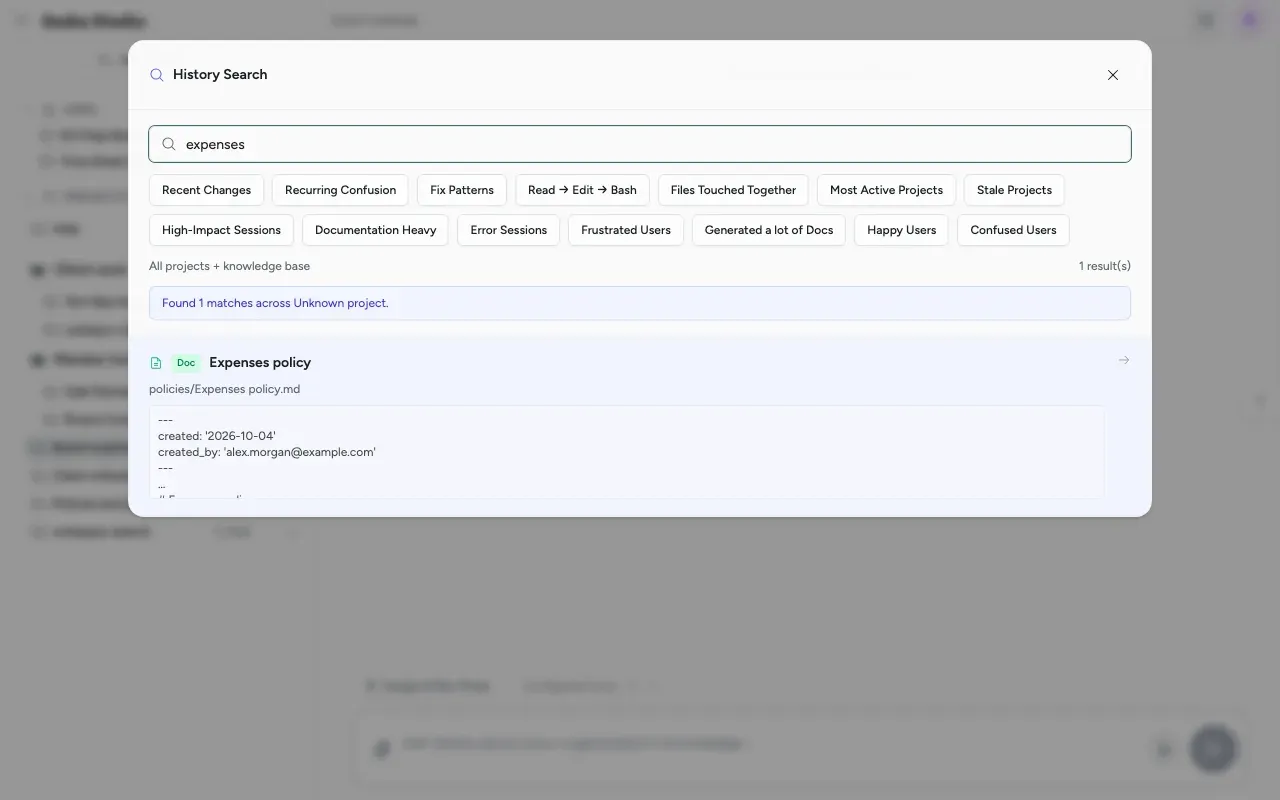
- Type a word in Search chats, history, and knowledge base.... The presets, such as Recent Changes and Error Sessions, search chat history. This page covers the document search.
- Read the results. A document shows a Doc label, its title, its path and the start of its text.
How the document part works:
- It looks at every Markdown document in your knowledge, in every project.
- It ranks the results. A match in the title counts most, an exact title adds more, and a match in a heading counts more than a match in the text.
- It shows up to 50 results.
- It keeps its list of documents for 2 minutes. A document added in the last 2 minutes can be missing.
Document search here uses the connectors permission, which admin and staff accounts hold.
The Knowledge list under a project
Open a project in the side menu. Under its chats, Knowledge lists the project's documents, with a count. Click a document to open it in the Files panel. The refresh button reads the list again.
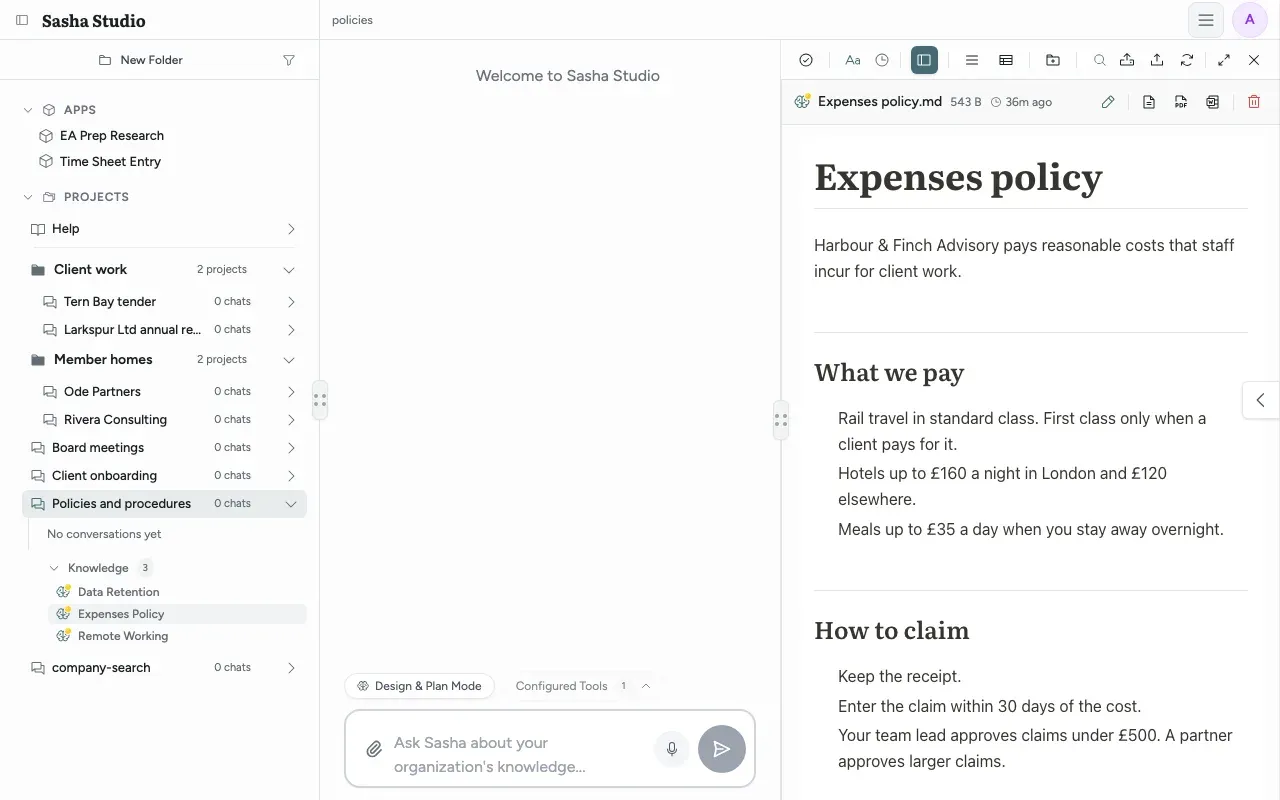
The list shows documents up to 3 folders deep in the project. For the full tree, use the Files panel (see Add, find, preview, download and remove the documents in your Sasha, and know what Sasha does to each file you upload).
Help Sasha find things
- Put each document in the right project. Search follows the projects a person can reach.
- Use clear titles and headings. Search Chats ranks titles and headings first, and Claude's search shows the first matching line.
- Use the words your team uses. Search matches text, not meaning.
- Upload Word, PDF, Excel and PowerPoint files, rather than unpacking them from a zip, so that Sasha makes a Markdown copy.
- Keep documents under 2 MB.
Limits to know
- Search matches text, not meaning. There is no index and no embeddings.
- Claude's search returns one line for each document and stops at 40 results. On a large knowledge base, ask Claude to limit the search to one project.
- Search Chats and Claude give different results for the same word, because they search in different ways.
- Search Chats finds only Markdown documents. Its summary line can say "across Unknown project" for document results.
- If the chat-history search is not available, Search Chats shows document results only, and no message says so.
- Knowledge Scan Depth in Settings → General does not change the Knowledge list, which always shows 3 folders deep.
- Archived projects are still searched.
Questions
Does Sasha use an index, embeddings or a vector database?
No. Every search reads the documents at the time you ask, and matches the words you give. A new or changed document is found straight away by Claude. There is nothing to rebuild.
Can Claude find my Word or PDF file?
Yes, through the Markdown copy that Sasha wrote when you uploaded the file. Claude's search does not cover the original in the uploads folder. A file that has no Markdown copy (for example a file from a zip, or a file over the conversion limit) is not found by its content.
Why does a search for a phrase find nothing?
Claude's search looks for the exact text you give, ignoring capital letters. "travel claims" does not match "claims for travel". Claude usually tries several words and synonyms; you can also ask it to search for one word.
Why does Claude show only one match for each document?
The search returns the first matching line of each document, so a long list is not filled by one file. Claude then reads the documents that look useful, and finds the other places there.
Why does Claude not find a very large file?
Claude's search skips files over 2 MB. Split a large document into smaller ones, or ask Claude to read that document by name.
Can a member search other members' homes?
No. A member's search covers their own home and the shared projects an admin granted them. Admin and staff accounts search every project, member homes included.
Why does Search Chats give different results from Claude?
They are two different searches. Search Chats looks only at Markdown documents and ranks them, for example a match in the title first. Claude's search covers seven text formats and lists matches in the order it finds them.
Are archived projects searched?
Yes. Archive only hides a project in the side menu. Sasha and Claude still search its documents.
Is there a separate knowledge website?
No. A link to a document in Sasha opens the Files panel at that document.