Approve, change or bin what an agent drafted
Why this exists
A follow-up email that goes to the wrong person, at the wrong time or in the wrong words can cost a customer. So an agent writes drafts, and a person decides. The draft is ready when you look, with the reason it was written, so a good draft takes one click and a bad one takes two.
An example
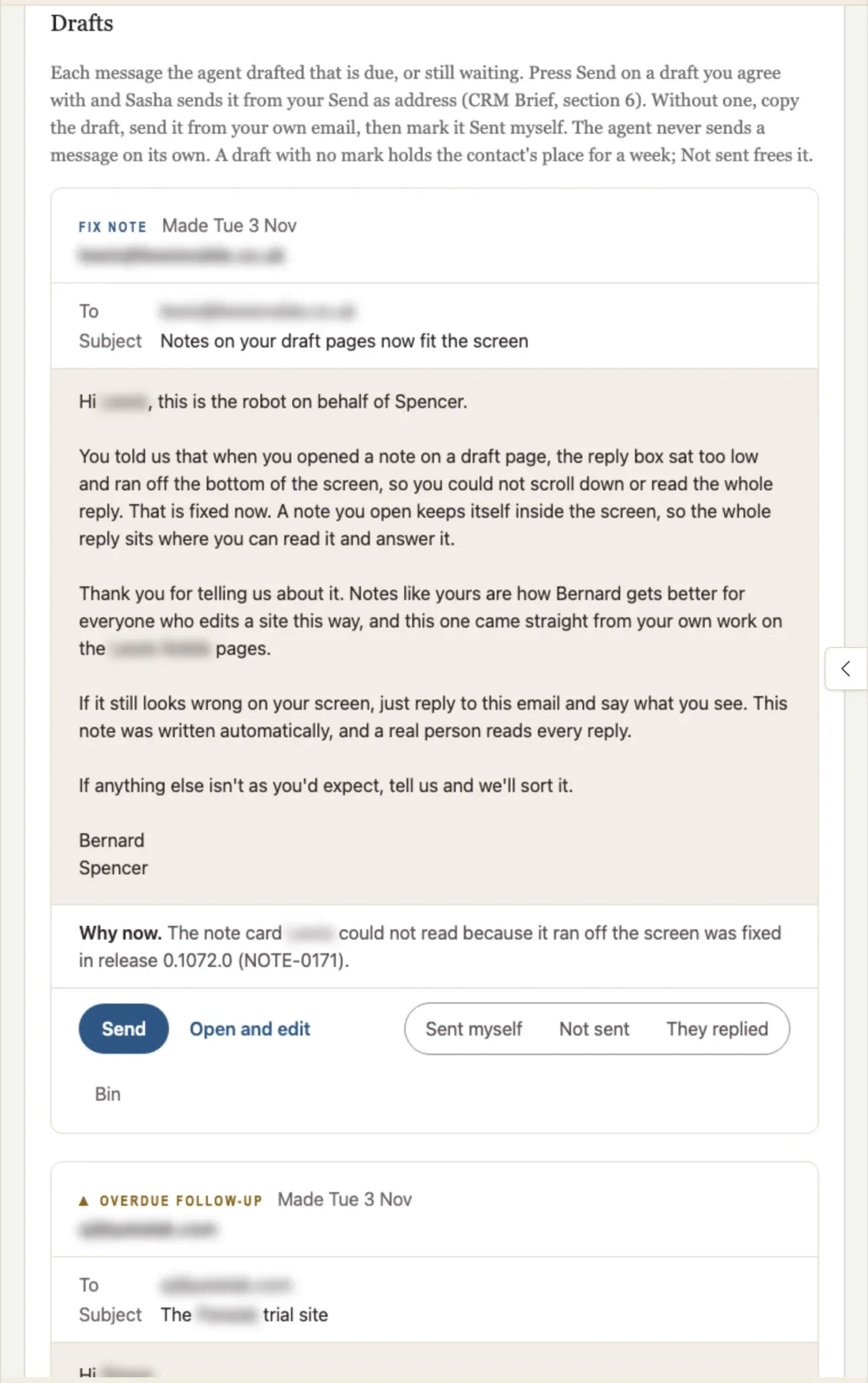
On 3 November the CRM Agent at Context is Everything drafted a note to a customer who had reported a problem on a draft page. The problem was fixed in that week's release. The draft says what was wrong, that it is fixed now, and thanks them for telling us. Under the message, Why now gives the agent's reason: the fix that shipped, with its reference.
The draft was right, so it needed one click: Send.
How to do it
- Open the agent under Agents that work for me, and scroll to Drafts on the Report tab. The report email also links to each draft.
- Read the message and Why now.
- Choose one:
- Send. The card asks "Send this to" the person, and says which address it goes from and that replies come to you. Press Send now.
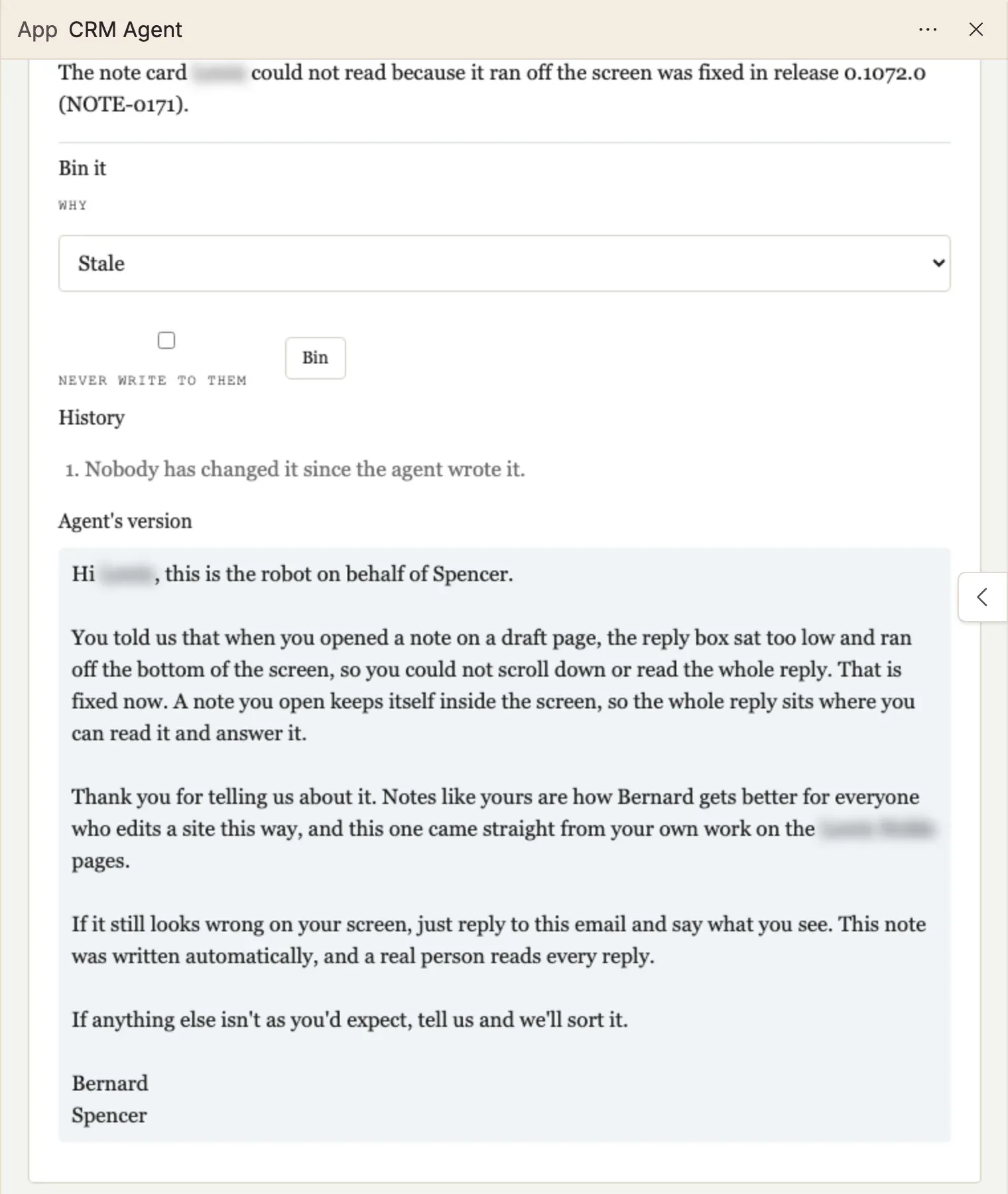
- Open and edit. Change the message, the To or the Subject, then press Save. Sasha keeps every version, with who changed it and when.
- Sent myself, Not sent or They replied. Tell the agent what happened to a draft that you dealt with yourself. The next run counts your mark.
- Bin. Choose why under Bin it (Stale, Wrong person, Not now or Other), then press Bin. Tick Never write to them to add the person to the never-write list.
Who can do this
- Admin: everything on this page, and adds a person to the never-write list.
- Staff: sends, edits, marks and bins drafts. Cannot add a person to the never-write list.
- Member: cannot sign in to the Sasha web interface, so does not see drafts.
For everything each role can do, see Who can do what in Sasha.
Limits today
- Send works only when an administrator has set up the Send as address in the agent's brief. Until then, use Copy and send from your own email.
- Other changes that an agent suggests, which are not messages, wait under Held items until an admin approves them.
More detail
- What an agent is and what it does: Let an agent do a regular job for you.
- Each button, with a picture of every step: the CRM Agent page.
Questions
Can the agent send a draft without me?
No. A draft goes only when a person presses Send, or sends it from their own email. Sasha never sends to a person on the brief's never-write list.
What happens if I do nothing with a draft?
The draft holds that person's place for a week, so the agent does not write a second message to them. Mark it Not sent to free the place.
I sent the message from my own email. How does the agent know?
Press Sent myself on the draft. The next run counts the person as written to. They replied tells the agent that the person answered.
Can I get a draft back after I bin it?
Yes, for 30 days. A binned draft stays on the Report tab, greyed, with Undo.
Why does Send show Copy instead?
Sending is not set up yet. The draft must go from a Send as address that your Sasha administrator has set up. Until then, Copy puts the message on your clipboard so you can send it from your own email, and you mark it Sent myself.
Can I ask Sasha in a chat instead of clicking?
Yes, if you are an admin or a staff user. For example, "make the note to the overdue lead shorter" or "bin the check-in draft". Claude can do the same through its Sasha connection.