Know where your organisation's data is kept, who can reach it, what leaves your Sasha and how secrets are protected
Where Sasha keeps files and chats, how long chats are kept, what your AI provider keeps, what data leaves your Sasha, and how Sasha protects the secrets it stores.
- Where
- Settings → General (Session retention, Activity Logging) and Settings → AI Admin (the AI provider). Most of this page describes how Sasha works, not a screen.
- Who
- Admins choose the AI provider and the retention settings. Everyone's data follows the rules on this page.
- Needs
- Nothing to set up. Some choices, such as the improvement export and the server's encryption key, are server settings that your technical operator controls.
What it is
This page goes deeper than Where your data lives in Sasha. It is for the admin who must answer questions about data protection: where things are kept, how long, who can reach them, what leaves your Sasha, and how secrets are stored.
One Sasha per organisation
Each organisation has its own Sasha: its own server, storage and database. Your Sasha runs in your organisation's cloud account, or Context is Everything hosts it for you.
| What | Where it is kept |
|---|---|
| Documents and projects | Files on your Sasha's storage, one folder per project |
| Members' homes | Folders on the same storage, one per member |
| Chats in the Sasha web interface | Transcript files on your Sasha's storage |
| People, roles, grants, keys, settings, connection logs | Sasha's database on the same server |
| App records | A separate database file for each app, on the same server |
Who can reach what
- Admin and staff can reach every project. Admin and staff accounts can see and work in every member's home.
- Members reach only their own home and the shared projects an admin grants. A member's home is private from other members. A project a member cannot reach gives the same "Not found" as a project that does not exist.
- An organisation that needs homes that no admin can see needs its own Sasha.
For roles and grants, see Understand exactly what each role can do, what keys and system accounts can reach, and what Sasha records.
How long things are kept
Both settings are in Settings → General (admins only).
| Setting | Choices | Default |
|---|---|---|
| Session retention: how long chat transcripts are kept | 30 days, 90 days, 1 year (recommended), Forever | 30 days when nobody has chosen |
| Activity Logging: how long raw activity records are kept | 1 to 3,650 days | 30 days |
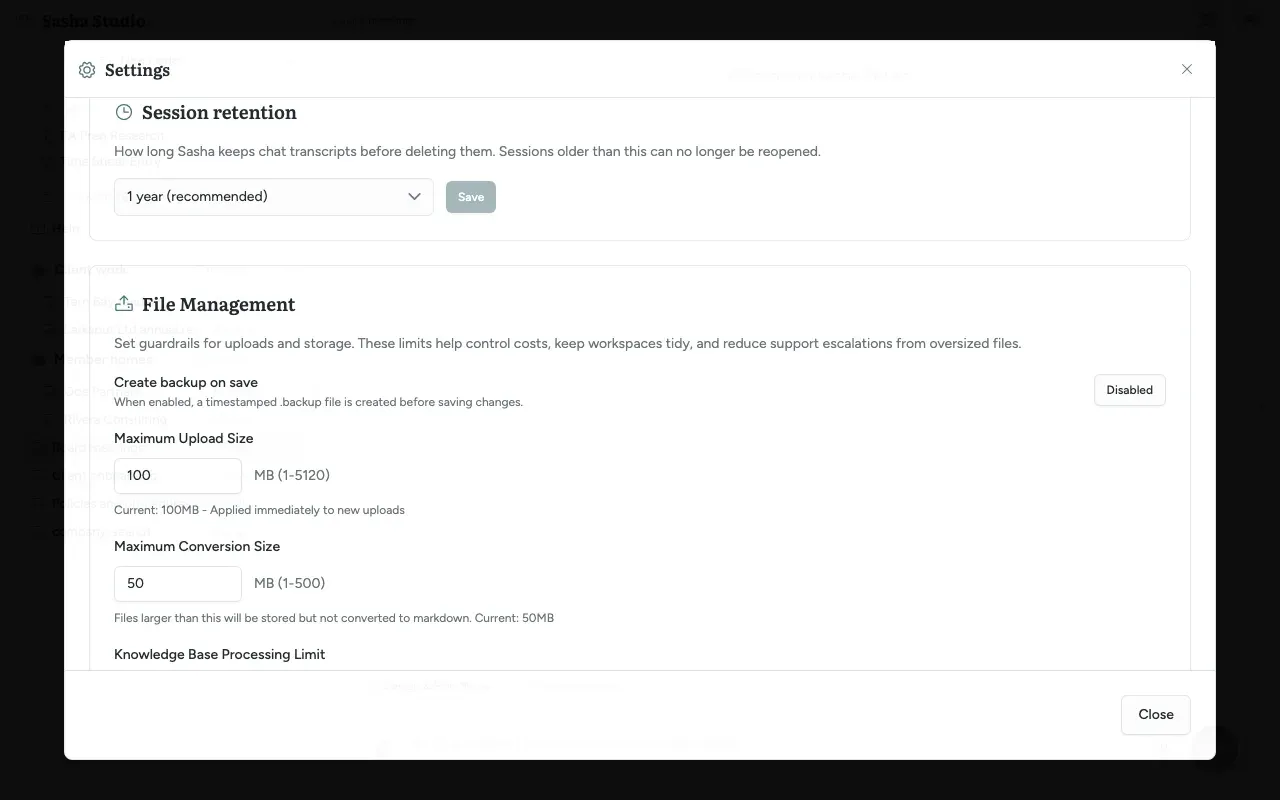
- After the retention time, Sasha deletes the chat and you cannot open it again.
- With Forever, transcripts build up without limit. Watch the disk space in Settings → System.
- Documents, members' homes and the audit records have no retention setting. Sasha keeps them until someone deletes them.
Your AI provider
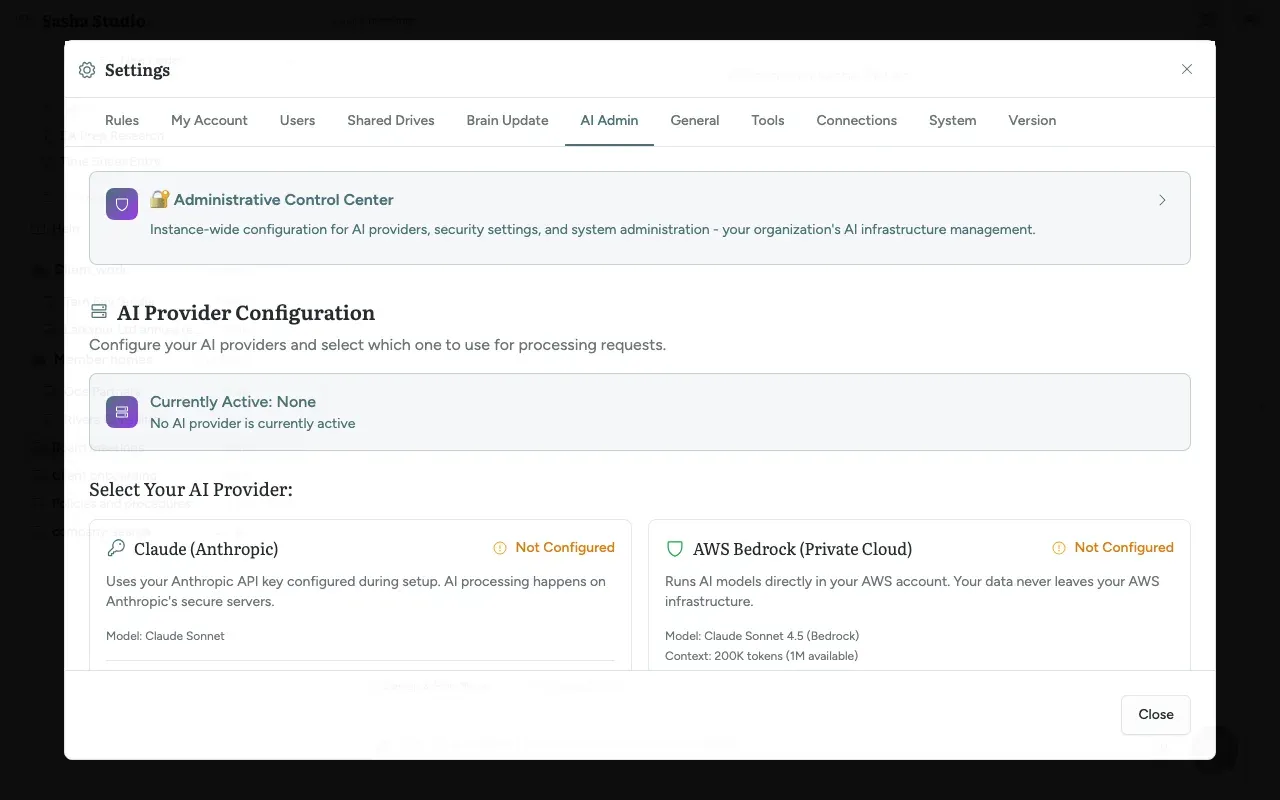
Sasha sends your prompts, and the parts of documents a chat reads, to the AI provider that an admin chose in Settings → AI Admin. See Choose where Sasha's AI runs, which model it uses, and how much it can read at once.
| Provider | Where the AI runs | What it keeps |
|---|---|---|
| Claude (Anthropic) | Anthropic's servers | Set by Anthropic's terms |
| Claude Subscription | Anthropic's servers | Set by Anthropic's terms |
| AWS Bedrock (Private Cloud) | An AWS account, in the region you chose | Opus, Sonnet and Haiku: not kept. Fable 5 and 5.1: up to 30 days for possible AWS review |
AWS allows Fable models only when the account's data-retention mode is aws_review. AWS then keeps those requests for up to 30 days for possible human review, inside AWS, and does not share them with Anthropic. The Bedrock card says "Your data never leaves your AWS infrastructure". It does not mention this review period. Ask who owns the AWS account: it can be your organisation's account or your hosting provider's.
What leaves your Sasha
| What | Where it goes | When |
|---|---|---|
| Prompts and document text in chats | Your AI provider | Every chat and skill run |
| Improvement suggestions | Context is Everything | When the team collects them. See Understand how Sasha reports its own gaps, what happens to each suggestion, and how to follow it |
| Bug reports from Report Issue | A GitHub issue for the Context is Everything team, and a separate unlisted GitHub page with recent log messages | Only when you submit the form |
| Browser analytics | PostHog, EU servers | Only if your Sasha was built with it |
| Welcome, password reset and 2FA reset emails | Postmark, the email service | When Sasha sends an email |
| What a connected service needs | That service (shared drives, other tools, Bernard) | When a chat or skill uses it |
| The meeting bot | The meeting service (Microsoft Teams or Google Meet) | When you send the bot into a meeting |
| Recent meeting captions | Your AI provider | When a Meeting Advisor is on during a meeting |
| Usage reports of the Claude tool that Sasha runs | Not confirmed. Sasha does not switch this reporting off, and what it sends is not known | Not confirmed |
Improvement suggestions. Each suggestion holds a short summary and an optional detail. Before the team collects it, Sasha replaces email addresses and file paths with "[redacted]", replaces user, connection and chat identifiers with one-way codes, and limits the detail to 2 KB. The kind, severity, project name and tool name (including the names of your own connected services) are sent as they are. A server setting stops the export; there is no screen for it.
Session signals. Every 6 hours, Sasha scans chat transcripts for fixed patterns, such as a tool that keeps failing. If your Sasha uses AWS Bedrock, a small model writes a short description of each signal, under a rule not to quote the transcript. The code calls this rule a best effort, not a guarantee. The description becomes an improvement suggestion.
Report Issue. The form sends your text, the page address, browser details and recent log messages to a GitHub issue. The log messages go into a separate unlisted GitHub page that anyone with its link can read. Sasha saves the screenshot on your own Sasha and copies it to your clipboard. It reaches GitHub only if you paste it in. If you type an email address, it becomes a label on the issue. If the server cannot file the issue, Sasha opens a pre-filled GitHub page in your browser instead.
Browser analytics. If your Sasha was built with PostHog, the browser sends page views and clicks with your user number, username and admin flag. To find out whether yours was, ask Context is Everything. It respects Do Not Track. No setting in Sasha turns it off.
Claude connections. Sasha logs each request that Claude makes to your Sasha. That log stays on your Sasha and is not sent elsewhere.
How stored secrets are protected
| Secret | How Sasha stores it |
|---|---|
| Your password | A one-way hash (bcrypt). Nobody can read it back |
| API keys and Claude connection tokens | A one-way hash. Shown once, when made |
| API key signing secrets | As they are, because Sasha needs them to sign callbacks |
| 2FA secrets | Encrypted with the stronger method (AES-256-GCM). The server does not start in production without its key |
| Sign-in tokens for connected services such as Bernard | Encrypted with the stronger method (AES-256-GCM) |
| AI provider keys, the Bedrock key, shared drive credentials, named secrets, the Vercel token and most tool settings | Encrypted with an older method (AES-256-CBC), which does not detect changes to the stored value |
For the last row, the server needs an encryption key setting. Today, if that setting is missing, Sasha falls back to a built-in key and gives no warning. A secret encrypted with the built-in key is only as safe as the server's storage. A move to the stronger method is planned. Ask your technical operator to confirm that your Sasha has its own key.
Limits to know
- Today, most connection secrets use the older encryption method, and a missing key setting falls back to a built-in key.
- The Bedrock card does not mention the 30-day AWS review period for Fable models.
- There is no screen to stop the improvement export or the session signal scan. Both are server settings.
- The Activity Logging text speaks of "audit depth", but the audit records of sign-ins and permission changes have no retention setting and no screen.
- The table of what leaves your Sasha may not be complete. Sasha does not switch off the usage reporting of the Claude tool it runs, and what that tool sends is not confirmed.
- If your Sasha was built with PostHog, no setting in Sasha turns it off. A browser with Do Not Track switched on sends nothing.
Questions
Is our data shared with other organisations?
No. Each organisation has its own Sasha, with its own server, storage and database. No other organisation uses it.
Which company sees our prompts and documents?
The AI provider that an admin chose in Settings → AI Admin. With AWS Bedrock, the AI runs in an AWS account in the region you chose. With Claude (Anthropic) or a Claude subscription, the AI runs on Anthropic's servers under Anthropic's terms.
Does AWS keep our prompts?
Only for Fable models. AWS allows Fable 5 and 5.1 only when the AWS account's data-retention mode is aws_review. In that mode AWS keeps those prompts and answers for up to 30 days for possible human review, inside AWS, and does not share them with Anthropic. Opus, Sonnet and Haiku requests are not kept.
How long are chats kept?
An admin chooses in Settings → General → Session retention. The choices are 30 days, 90 days, 1 year or Forever. When nobody has chosen, Sasha keeps chats for 30 days. Sasha deletes older chats, and you can no longer open them.
Can admins and staff see members' homes?
Yes. Admin and staff accounts can see and work in every member's home. A member's home is private from other members, but not from admin and staff. An organisation that needs homes that no admin can see needs its own Sasha.
Does Sasha send our conversations to Context is Everything?
Context is Everything does not receive your chat transcripts or documents. It receives the improvement suggestions that Sasha files, with email addresses and file paths removed, and the bug reports you send with Report Issue. A suggestion's summary can describe what you were doing.
Does Sasha track how we use the web interface?
Only if your Sasha was built with PostHog analytics. To find out, ask Context is Everything. If it was, the browser sends page views and clicks to PostHog's EU servers, with your user number, username and whether you are an admin. It respects the Do Not Track setting of your browser.
How are the passwords and keys for connected services protected?
Sasha stores them encrypted on your server. Today, most of them use an older encryption method, and if the server's encryption key setting is missing, Sasha falls back to a built-in key. A move to a stronger method is planned. 2FA secrets and sign-in tokens for connected services already use the stronger method.
Can we stop the improvement export?
Yes. A server setting switches it off. There is no screen for it today, so ask your technical operator or Context is Everything.