Choose where Sasha's AI runs, which model it uses, and how much it can read at once
Settings → AI Admin connects Sasha to an AI provider (Anthropic, a Claude subscription or AWS Bedrock), chooses the model and sets the context window.
- Where
- Settings → AI Admin → AI Provider Configuration
- Who
- Admins only. The tab is hidden from other accounts, and the server refuses provider changes without the system:manage capability.
- Needs
- One of an Anthropic API key, a Claude Max or Team subscription with the Claude Code CLI, or an AWS Bedrock API key with model access in your AWS account.
What this screen is for
Sasha uses Claude models to answer. AI Admin decides where those models run and which one Sasha uses. The banner at the top shows Currently Active: and the provider in use, for example "Your AI requests are processed in your AWS us-east-2 region".
The three providers
| Card | You supply | Where the AI runs | Who bills you |
|---|---|---|---|
| Claude (Anthropic) | An Anthropic API key (sk-ant-api03-…) from console.anthropic.com |
Anthropic's servers | Anthropic, per use |
| Claude Subscription | A token from claude setup-token (sk-ant-oat01-…), valid for 1 year |
Anthropic's servers | Your Claude Max or Team subscription |
| AWS Bedrock (Private Cloud) | A Bedrock API key and an AWS region | Your AWS account | AWS |
Each card shows Active, Configured & Ready or Not Configured, and What is this? explains it. A configured card has Make Active and Settings.
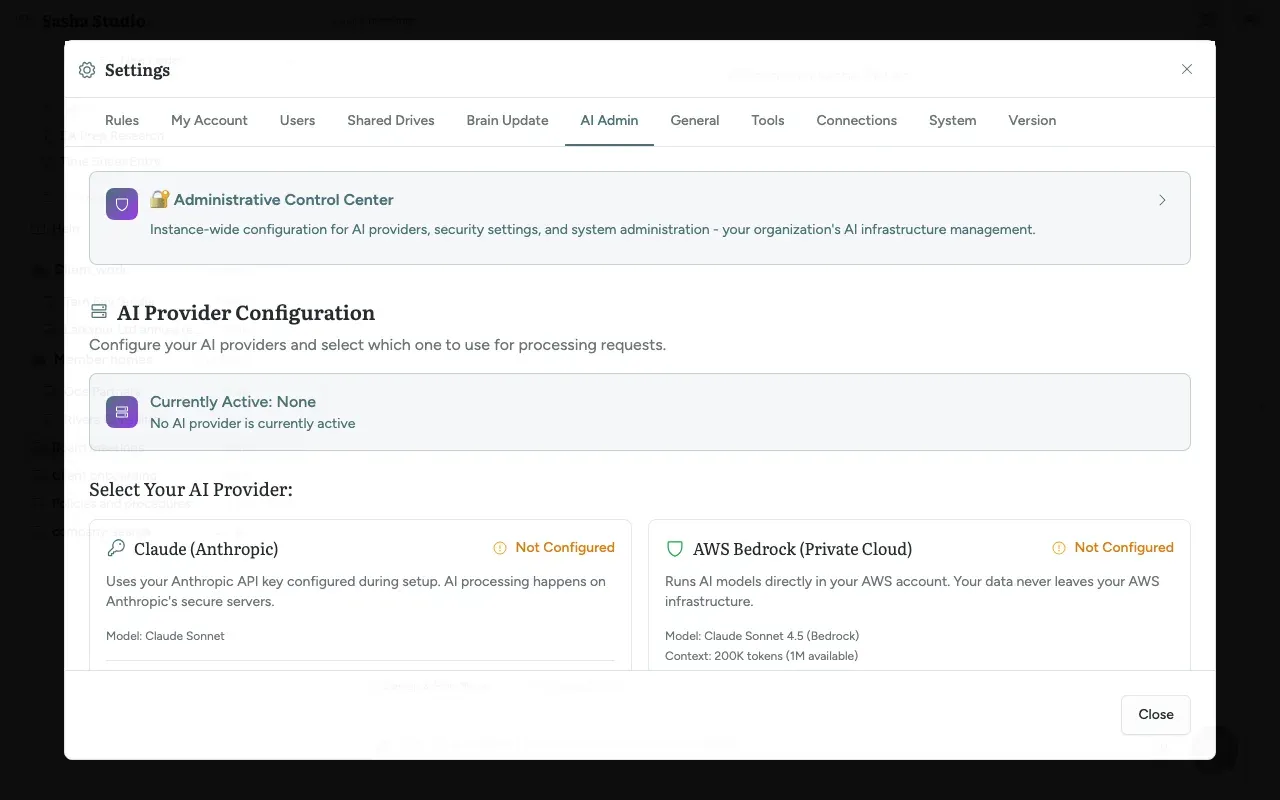
Set up a provider
Claude (Anthropic)
- Click Configure Provider → on the card.
- Paste the key into Anthropic API Key.
- Click Test Connection. Save & Update works only after the message "API key is valid and working!".
Claude Subscription
- On a computer with the Claude Code CLI, open a terminal and run
claude setup-token. Sign in when asked. - Paste the token into Subscription Token and click Save & Connect.
- The token lasts one year. The card shows Token Expired when you must repeat this.
AWS Bedrock
- Click Configure Bedrock →. Choose the AWS Region and paste the Bedrock API Key (it starts with
ABSKQmVkcm). - Click Get available models from Bedrock. Sasha sends a short test to each model and lists those your AWS account can use.
- Choose a model under Select Model, and set Token Limits if needed (Max Output Tokens 1,024 to 64,000, default 8,192; Max Thinking Tokens 512 to 4,096, default 1,024).
- Click Save & Activate. The warning box says this applies to every person in your Sasha.
Saving a provider makes it the active one.
Choose the model
Use Default Model under the active provider.
- With Anthropic or a subscription: Claude Sonnet, Sonnet 5, Sonnet 4.6, Opus or Fable.
- With Bedrock: Fable 5.1, Fable 5, Opus 5.5, Opus 5, Sonnet 5, Opus 4.8, Opus 4.7, Opus 4.6, Sonnet 4.6 or Sonnet 4.5. The list is available after Bedrock is configured.
The change applies to the next message in every chat.
Context window (Bedrock)
The Bedrock card shows the current window, for example Context: 1M tokens (Extended) or 200K tokens (1M available).
| Model | 1M by default | Cost |
|---|---|---|
| Fable 5.1, Fable 5, Opus 5.5, Opus 5, Opus 4.8, Opus 4.7, Sonnet 5 | Yes. You can switch it off | Standard |
| Opus 4.6, Sonnet 4.6 and older | No. 1M Context Window switches it on after two confirmations | Higher |
If you change to a model that cannot use 1M, Sasha switches 1M off.
Limits to know
- One provider and one model for the whole Sasha.
- No automatic fallback to another provider.
- The Sasha screens do not warn about the AWS data-retention rule for Fable. Set it in AWS first.
- The Quick Settings badge in the chat shows the provider for Anthropic and Bedrock, but shows "Not configured" for a subscription. People who are not admins see "Set by your admin".
Questions
Which provider do I choose?
Claude (Anthropic) is the quickest start; AI runs on Anthropic's servers and you pay Anthropic per use. Claude Subscription uses a Claude Max or Team subscription you already have. AWS Bedrock (Private Cloud) runs the models in your own AWS account and region, so your data stays in your AWS infrastructure and AWS bills you.
Does the choice apply to everyone?
Yes. The provider and the model are one setting for the whole Sasha. Every person's next message uses them; nobody has to restart.
Can people choose their own model?
No. Only an admin chooses the model, here. A skill can name its own model in its settings, and Sasha uses that model for the skill.
People see "No AI provider is configured". What do I do?
Sasha shows that message to everyone when no provider key is set. Open Settings → AI Admin and set up a provider. The message names "Settings → AI Provider"; the tab is AI Admin.
What happens if the provider stops working?
Chats fail with an error. Sasha does not switch to another provider by itself. A Bedrock key with an expiry date stops on that date; Configuration Notes in the Bedrock settings is a place to note the expiry.
What is the 1M context window?
The context window is how much text a chat can hold at once. With 1M (about a million tokens) a chat can work with far more documents before Sasha shortens it. Several newer models (Fable, Opus 5.5, Opus 5, Opus 4.8, Opus 4.7, Sonnet 5) use 1M on Bedrock by default at standard price. Older models can use it only if you switch it on and accept a higher cost.
Why do Fable models fail on Bedrock?
AWS allows Fable 5 and 5.1 only when your AWS account's data-retention mode is aws_review in that region. In that mode AWS keeps those requests for up to 30 days for possible review inside AWS; it does not share them with Anthropic. Opus, Sonnet and Haiku are not kept, whatever the mode. The setting is in AWS, not in Sasha, and takes about 5 minutes to apply.
Where are the keys kept?
On your Sasha server, stored encrypted. The screen never shows a saved key again; a saved Bedrock key shows "Key on file".