Understand exactly what each role can do, what keys and system accounts can reach, and what Sasha records
How Sasha's permission model works behind the three roles, what an API key from My Account can do, what service principals are, and which audit records Sasha keeps.
- Where
- Settings → Users for roles and member grants. Settings → My Account → API Tokens for your own API keys.
- Who
- Admins manage people, roles and service principals. Admin and staff accounts make and revoke their own API keys. Members have no Studio screens.
- Needs
- Nothing to set up. The permissions come with each role.
What it is
Every person in your Sasha has one role: admin, staff or member. Add people to Sasha, give each person a role, and control what members can reach explains how to add people and change their role. This page explains what sits behind a role: the capabilities it holds, the keys a person can make, the system accounts for integrations, and the records Sasha keeps of each change.
Roles, capabilities and ceilings
A capability is one named permission. A role gives a person two things:
- a default set: the capabilities the person has;
- a ceiling: the most capabilities the role can ever hold.
Sasha refuses a request that asks for more than the ceiling. It does not reduce the request quietly.
| Capability area | Admin | Staff | Member |
|---|---|---|---|
| Read knowledge | Yes | Yes | Own home and granted projects |
| Create and edit documents | Yes | Yes | Own home, and shared projects granted Read & write |
| Delete documents | Yes | Yes | No |
| Chat, sessions, skills, meetings, schedules | Yes | Yes | No |
| Use apps | Yes | Yes | Use only |
| Use connectors and shared drives | Yes | Yes | No |
| Connect Claude to Sasha | Yes | Yes | Yes |
| Revoke own Claude connections in Settings | Yes | Yes | No (removes the connector in Claude) |
| Make and revoke own API keys | Yes | Yes | No |
| Manage connectors and shared drives | Yes | Optional, off | No |
| See all sessions, the Console, all keys and connections, team usage | Yes | Optional, off | No |
| Manage people, permissions, system settings, improvements | Yes | Never | Never |
"Optional, off" means the model allows it for staff, but nothing can switch it on today. So every staff account has exactly the staff default set. For example, the Console item in the menu needs a capability that staff do not have by default, so staff never see it.
Admin and staff accounts can see and work in every member's home. A member's home is private from other members, but not from admin and staff. An organisation that needs homes that no admin can see needs its own Sasha.
Member grants
A member reaches only their own home and the shared projects an admin grants. Choose Knowledge Grants on the member's row in Settings → Users. For each shared project, choose No access, Read or Read & write. All projects sets every project at once. Save grants replaces the member's whole set of grants.
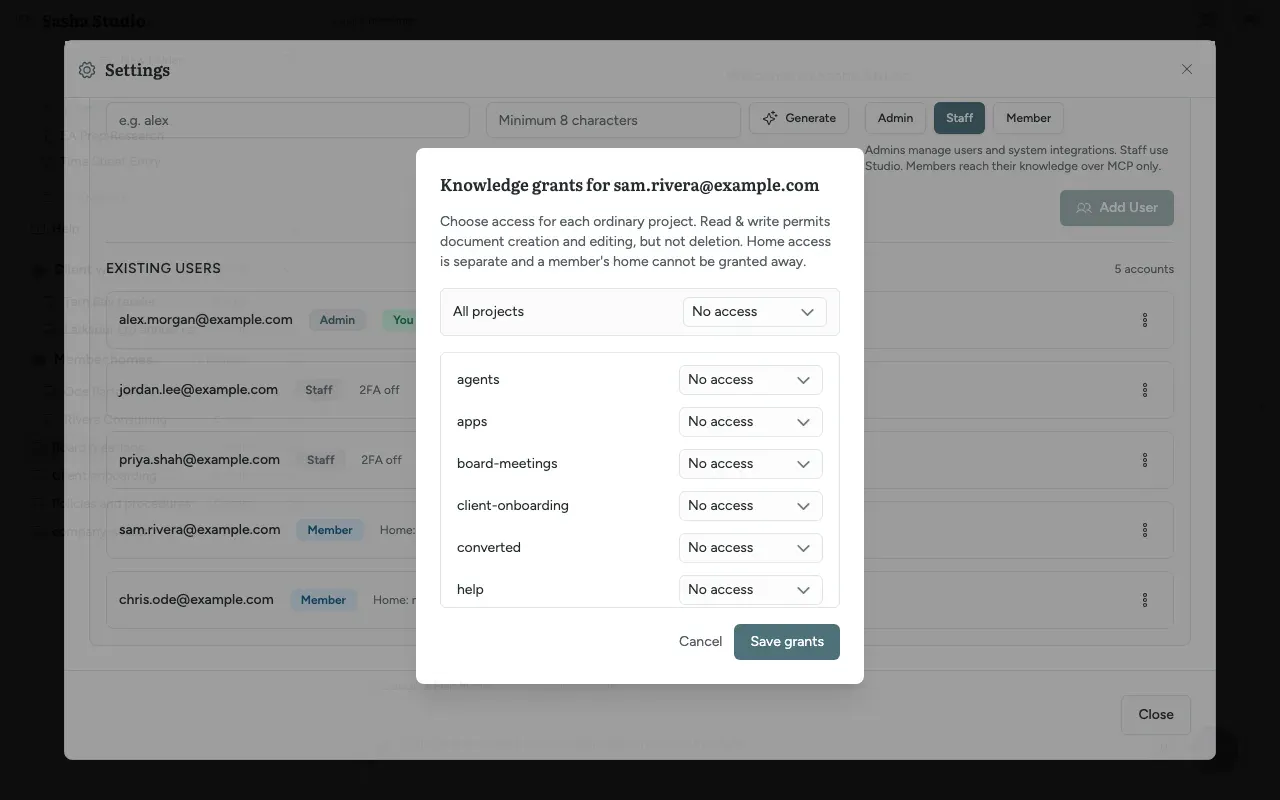
- Read & write lets the member create and edit documents, but never delete them.
- A member's home is separate. You cannot grant it to another member.
- Moving a person into or out of the member role removes all their grants.
API keys (My Account → API Tokens)
An API key lets another application use Sasha's API as you. Admin and staff accounts make their own keys in Settings → My Account → API Tokens.
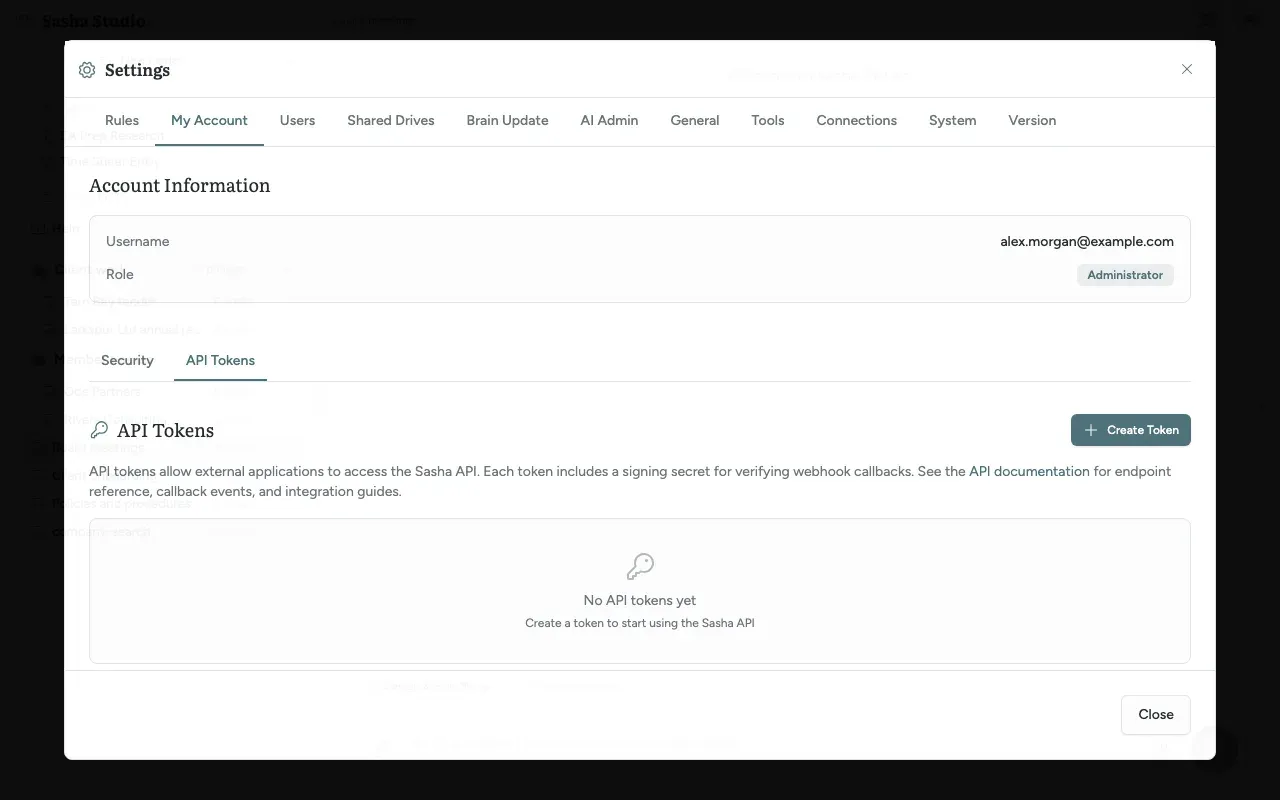
- Click Create Token.
- Type a Name. Optionally type a Default Callback URL, where Sasha sends results.
- Click Create.
- Copy the API Key and the Signing Secret now. Sasha shows them only once. The signing secret lets your application check that a callback really came from Sasha.
Each key in the list shows its grant, when it was Created and when it was Last used. The pencil button changes the name or callback address. The bin button revokes the key; Sasha asks you to confirm, and you cannot undo it.
What a key from this screen can do:
- read and write knowledge;
- read and manage meetings;
- never more than you can do yourself.
Service principals and custody
A service principal is a system account for an integration, not a person. Each service principal has an admin who looks after it: its custodian.
- There is no screen for service principals. An admin makes and manages them through the admin API.
- A service principal can never manage other service principals.
- When you demote or delete an admin who is a custodian, Sasha shows Transfer service principal custody. Choose a New custodian (another admin), then Transfer custody and demote or Transfer custody and delete. The service principals keep their permissions.
Audit records
Sasha writes an audit record in the same step as each change to people, roles, member grants, API keys, Claude connections and service principals. If Sasha cannot write the record, it cancels the change. Not every change gets a record: for example, a change to your own password leaves none (Sign in safely, protect your account with 2FA, and get back in when you are locked out). Records cannot be changed afterwards and hold no secrets.
| Record | Examples |
|---|---|
| Who changed what | A person added, deleted or given a new role; member grants changed; an API key made or revoked; a Claude connection revoked; a service principal made, changed or moved to a new custodian; app access changed |
| Sign-in events | Wrong passwords, lock-outs, a member refused at the Studio sign-in, 2FA set up, removed or reset by an admin, a Claude connection approved |
No screen shows these records today. If you need them, ask your technical operator. Permission Audit under Reporting is a different thing: it shows the permission modes of Claude's tools in chats.
Limits to know
- Today, Sasha records each permission check but blocks the request only on some routes: people and roles, Claude connections, projects, apps, shared drives, connected services, schedules, service principals and the improvement export. On other routes, a request beyond the person's capabilities is logged and allowed. For example, a key can start a skill through the external API when that skill allows API runs, although the key's grant does not include running skills.
- No screen or command can give one person extra capabilities or take some away. Each person has exactly their role's default set.
- Every key made on the API Tokens screen has the same grant. You cannot choose a narrower one there.
- Today, you cannot clear a key's callback address once it is set. Revoke the key and make a new one.
- Sasha keeps the signing secret of an API key in a form it can read, because it uses the secret to sign callbacks. Sasha keeps only a one-way hash of the key itself.
- The account menu shows "Administrator" or "User". It never shows "Staff" or "Member".
- The custody dialog says the person will be "demoted to a standard user" even when the new role is member.
Questions
What is a capability?
A capability is one named permission, for example to read knowledge, run skills or manage people. Each role has a default set of capabilities and a ceiling, which is the most that role can ever hold. Sasha checks the person's role again on every request, so a role change applies at once.
Can I give one staff member extra rights, such as the Console?
Not today. The permission model has optional capabilities for staff, but no screen or command can switch them on. Every staff account has exactly the staff default set. The note under Roles and access that mentions individual permission changes describes something that does not exist today.
Can I make a staff account able to manage people?
No. Managing people, permissions, system settings and the improvement export are above the staff ceiling. Only an admin can do these things. To give a person these rights, make them an admin.
Can admins and staff see members' homes?
Yes. Admin and staff accounts can see and work in every member's home. A member's home is private from other members, but not from admin and staff. An organisation that needs homes that no admin can see needs its own Sasha.
What can a key made under My Account do?
Every key made on that screen gets the same grant. It can read and write knowledge, and read and manage meetings. It can never do more than you can do yourself. You cannot choose a narrower grant on the screen.
I lost the signing secret of an API key. Can I see it again?
No. Sasha shows the key and its signing secret once, when you create the key. Revoke the key and create a new one.
What happens to a person's keys when I make them a member?
Sasha revokes every API key the person holds, in the same step as the role change. Making them staff again does not bring the keys back.
Can an admin see or revoke another person's API keys?
Not on a screen. The API Tokens tab lists only your own keys. To stop another person's keys, change their role to member or delete the account.
What is a service principal?
A service principal is a system account for an integration, not a person. An admin looks after each one, and that admin is its custodian. Service principals have no screen; they exist only through the admin API.
Where can I read the audit log?
Nowhere today. Sasha records who changed what, and sign-in events, but no screen shows these records. Permission Audit under Reporting is about the permission modes of Claude's tools, not about people's permissions.
Does a demotion take effect at once?
Yes. Sasha reads the role again on every request, from the web interface and from Claude, so a demotion makes an existing Claude connection smaller at once. A promotion does not make a connection larger. Ask the person to connect Claude again.